When I tell another maker I run an AI community, I sometimes get a confused look. “Oh, I already use AI. It’s easy.” And they’re not wrong, exactly. They ask ChatGPT to rewrite an Etsy listing, get back something that looks great, and run with it.
That’s the trap. AI has gotten so good that the lazy way produces output that looks finished, so you never find out what you left on the table. And here’s the part that should bug you: that good-enough output is the exact stuff that reads as AI to everyone who sees it. Same reason a rushed listing blends into a thousand others.
The makers getting real results aren’t using better tools. They have a foundation under the tools. That’s the whole difference, and it’s what this is about.
So before you go collect a 47-tool “AI business stack” off your feed, here’s the stack I actually run a maker business on, and the order to build it in.
Use your tools like a workshop, not a slot machine
You need a few good tools, each with a job, not a folder full of apps you open once.
ChatGPT is my workhorse. Pick it up, put it down. It’s brilliant at following clear instructions, and its tooling and app connectivity are second to none. Claude comes in three flavors: the web chat, Claude Cowork on your desktop, and Claude Code, which is my favorite because it’s where you finally give Claude hands. For images I generate in ChatGPT and edit in Google’s Nano Banana. Each is a specific tool for a specific job, with some overlap. None is “the best.” They work best together.
But the tool isn’t the point. Consistency is. I built a custom GPT that does exactly one thing: turn any animal into an old-time, black-and-white mugshot holding a little sign. At a show, a customer hands me a photo of their dog, and a few minutes later it’s a magnet coming off my eufyMake E1 UV printer. They light up, then they order three more for their sister. I’ve even done a wedding save-the-date that way, the couple’s dog in the mugshot.
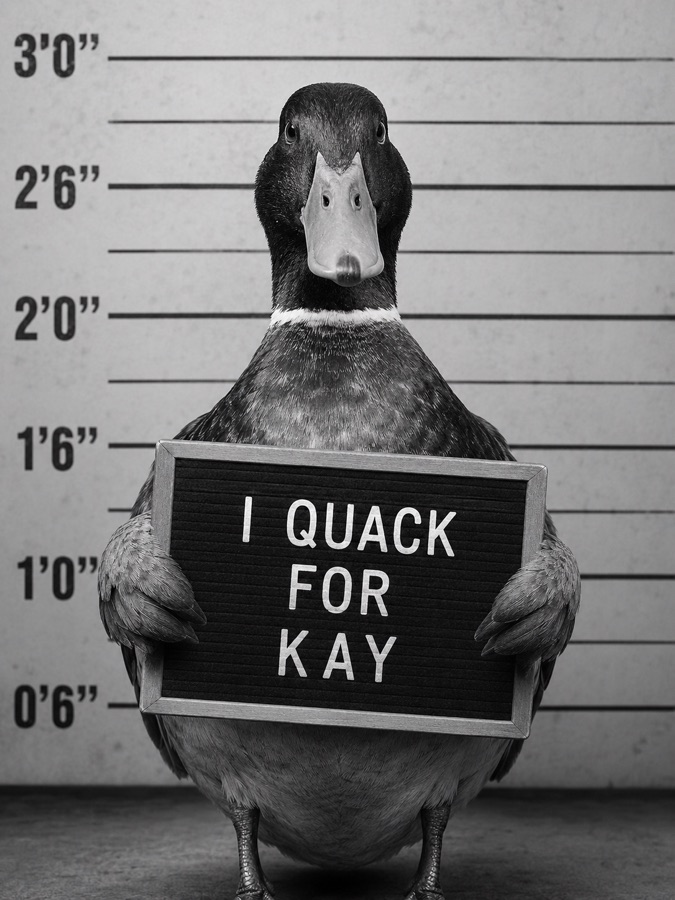


Before that custom GPT, every magnet meant digging up a prompt, editing it, pasting it in, and pulling the lever hoping for a usable image. Now it’s repeatable. Hope is great. It’s just not a strategy.
The foundation is the whole game
Back in the early ChatGPT days there were no projects, just chats. So I kept notes: who I am, what I make, how my business runs. And I’d paste them in again every single time. You’d slowly build up context until the thing finally felt like it understood you and your shop, and the answers got genuinely good. Then you’d hit the wall, the chat would fill up, and you’d start over. Hours per session just to claw back to one solid answer.
Now projects in ChatGPT and Claude let you set that foundation once. Plug in a real source of truth (I run Google’s NotebookLM into Claude for some of mine) and the AI stops guessing and stops hallucinating its way to a generic answer.
This is the real reason your AI output reads as AI. Not because you used AI. Because it had nothing of yours to work from. Give it three things, set up once, and the output stops sounding like everyone else’s:
- Your voice. A few of your best listings or captions, saved, so it writes the way you write.
- Your numbers. Your real costs, written down, so pricing is a decision and not a vibe.
- Your policies. Turnaround, custom-order rules, what you will and won’t take on.
That’s the foundation. Everything else leans on it.
If you want a running start, my free Maker AI Starter Kit hands you that Foundation template plus five prompts built to use it.
The workflows that actually buy back your time
With the foundation in place, the repeatable jobs are where AI pays you back. Listings come first, because you do them constantly and they feed your SEO. (I broke down the three workflows I’d set up first separately.)
Here’s one from my own week. My phone, like yours, was a graveyard of screenshots: inspiration from Pinterest and Etsy I swore I’d use someday, plus a few hundred near-identical photos of the grandkids. I wrote a script that runs the whole library, flags the blurry and badly framed shots, keeps one clean version of each, groups the related ones, and drops everything it wants to cut into a “review later” folder. Because as good as it is, you still need your maker brain in the loop. I’m not deleting a grandkid photo on a robot’s say-so.
The hours that came back didn’t turn into more screen time. They went to family, to building this community, to actually making. I’m no longer sitting there playing “have I seen this one already, number one or number two,” like an eye exam.
What’s actually hype (and safe to skip)
Now the honest part: the tool I dropped. OpenClaw.
It pains me to say it, because OpenClaw genuinely changed the landscape. A lot of why we’re all even talking about agents traces back to it. When I first installed it, it ran, it had memory, it learned. I was hooked.
But the team shipped several times a day, and the updates kept breaking things. You can’t run a maker business on a system you have to babysit for hours, troubleshooting just to get a usable result. So OpenClaw had to go. I moved to Hermes, which has been around just as long and simply works. I even kept Clawdia, my little agent from the OpenClaw days, too much personality to fire. She watches Hermes for updates, checks they won’t break what I run, and if I don’t get back to her she does the upgrade herself. A system, plus an agent that maintains the system, so I stay on the business.
Here’s the takeaway for you. I run that deeper stack (Paperclip, Hermes, Codex, custom skills) because running an AI studio is my actual job. It is not yours. (And when I gave that studio too much rope, it mailed my whole list twice without asking me — one more reason autonomous agents are my problem to babysit, not yours.) You don’t need autonomous agents. You need a couple of reliable tools sitting on a solid foundation. The bleeding edge is where you lose your evenings.
Build it in this order
Don’t buy a stack. Build one. Foundation first. Then one tool, one workflow, lived with for a week before you add the next. Three to five things you genuinely use will run circles around a folder of fifty you don’t.
That’s exactly how we do it inside the Maker Growth Hub: the foundation pieces, the prompts, and the templates already built, with people around you who run real shops, not gurus selling levers to pull.
Use the speed. Keep the soul.
Keep reading
- How to prompt ChatGPT for your maker business (so it stops giving you wrong answers)
- My AI Agents Sent a Newsletter to 655 People. Nobody Asked Me.
- The 3 AI workflows every maker should set up first
Ready to put this to work? Join the Maker Growth Hub.